Build Your Brand Voice with an AI Persona
Last updated: June 2, 2026
About Personas
A Persona is a comprehensive guide to your brand's style, communication goals, target audience, and content rules. It serves as Ella's strategic foundation within each Social Space. When you ask her to write a draft post or edit a caption, she references this active Persona to ensure every output sounds like a polished member of your team.
You can set up a Persona in two distinct ways:
Ella Assisted: Chat with Ella to let her learn about your brand naturally, or provide your website URL so she can crawl your site and build the profile for you.
Questionnaire: Fill out a structured form manually across key sections—such as your brand identity, values, tone Dos and Don'ts, and creative boundaries.
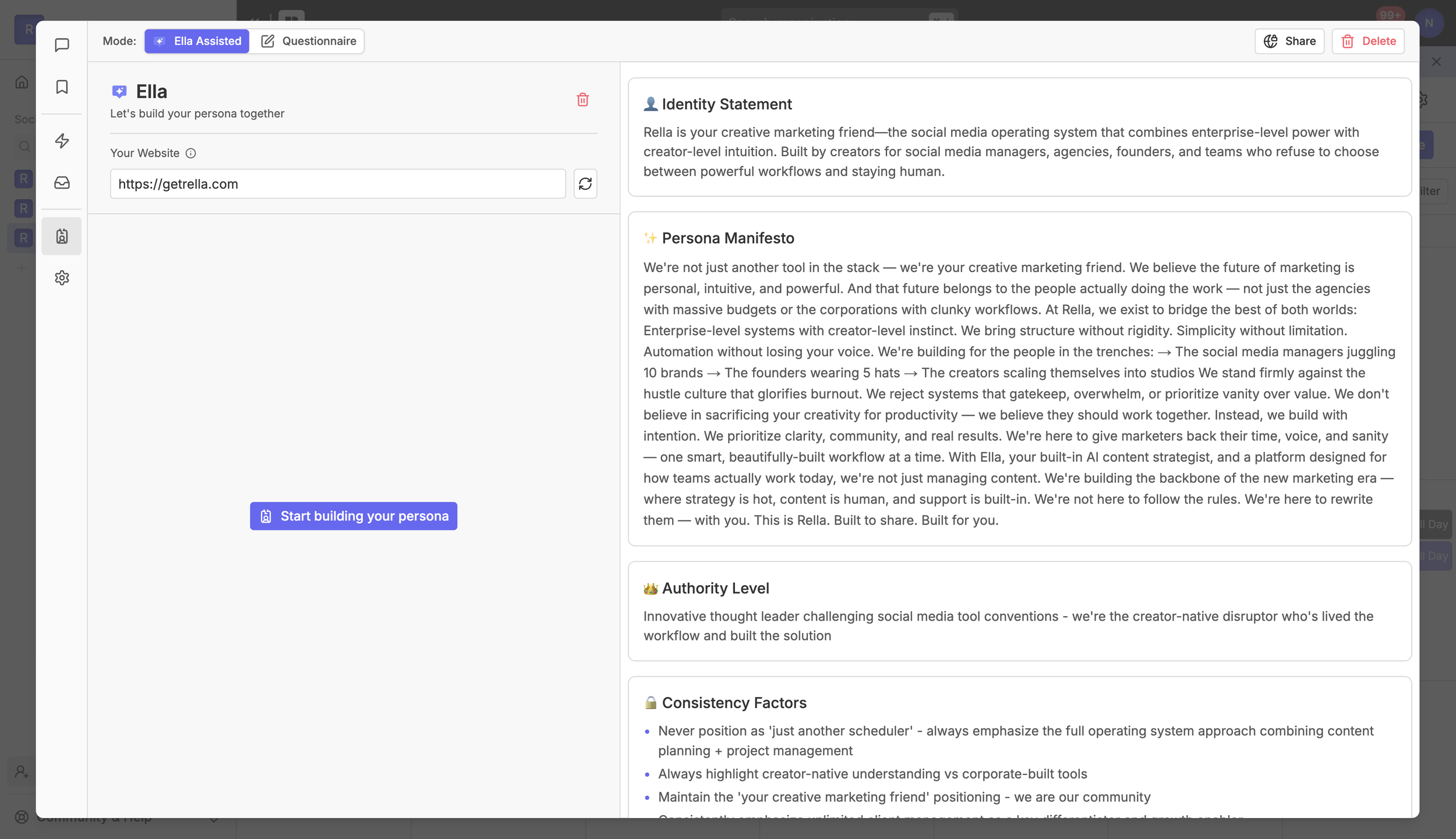
Persona Details
A complete Persona covers every dimension Ella needs to write and think like your brand:
Identity Statement. A concise summary of who your brand is, what it does, and the angle it brings to the world.
Persona Manifesto. Your north-star narrative: what you stand for, the change you want to create, and how you show up consistently.
Non-Negotiables. Hard rules Ella must always follow, spanning tone, claims, safety, compliance, or brand posture.
Authority Level. How your brand positions itself in within the desired industry.
Consistency Factors. Specific rules Ella should always applies when providing recommendations.
Values. The core beliefs that drive the brand.
Voice Traits. Adjectives and phrases that describe how the brand sounds, with the option to add custom traits or choose from suggestions.
Tone Guidelines. Explicit do's and don'ts that shape the energy and phrasing of your content
Goals. What your brand is working toward.
Audience Intent. Who you're speaking to and what you want them to feel
Platform Voice Shifts. How your tone adapts across social and marketing platforms.
Content Boundaries. What your brand will never do or say.
Content Preferences. Preferred formats, recurring themes, and creative constraints
How to Create Your Persona
To create or edit a Persona, you must open Rella on a desktop web browser. While you can preview your active profile from a mobile device, full editing features are currently desktop-focused.
Click Ella to expand her sidebar panel on the right side of your screen.
Select the Persona tab from her navigation menu.
If this is your first time setting up a Persona in this Social Space, click the Get Started button on her empty state.
Use the mode toggle at the top of the interface to select either Ella Assisted or Questionnaire.
Option A: Build Automatically with Ella Assisted Mode
If you already have an active website or want Ella to guide you through the process, the assisted mode is the fastest path to set up your profile.
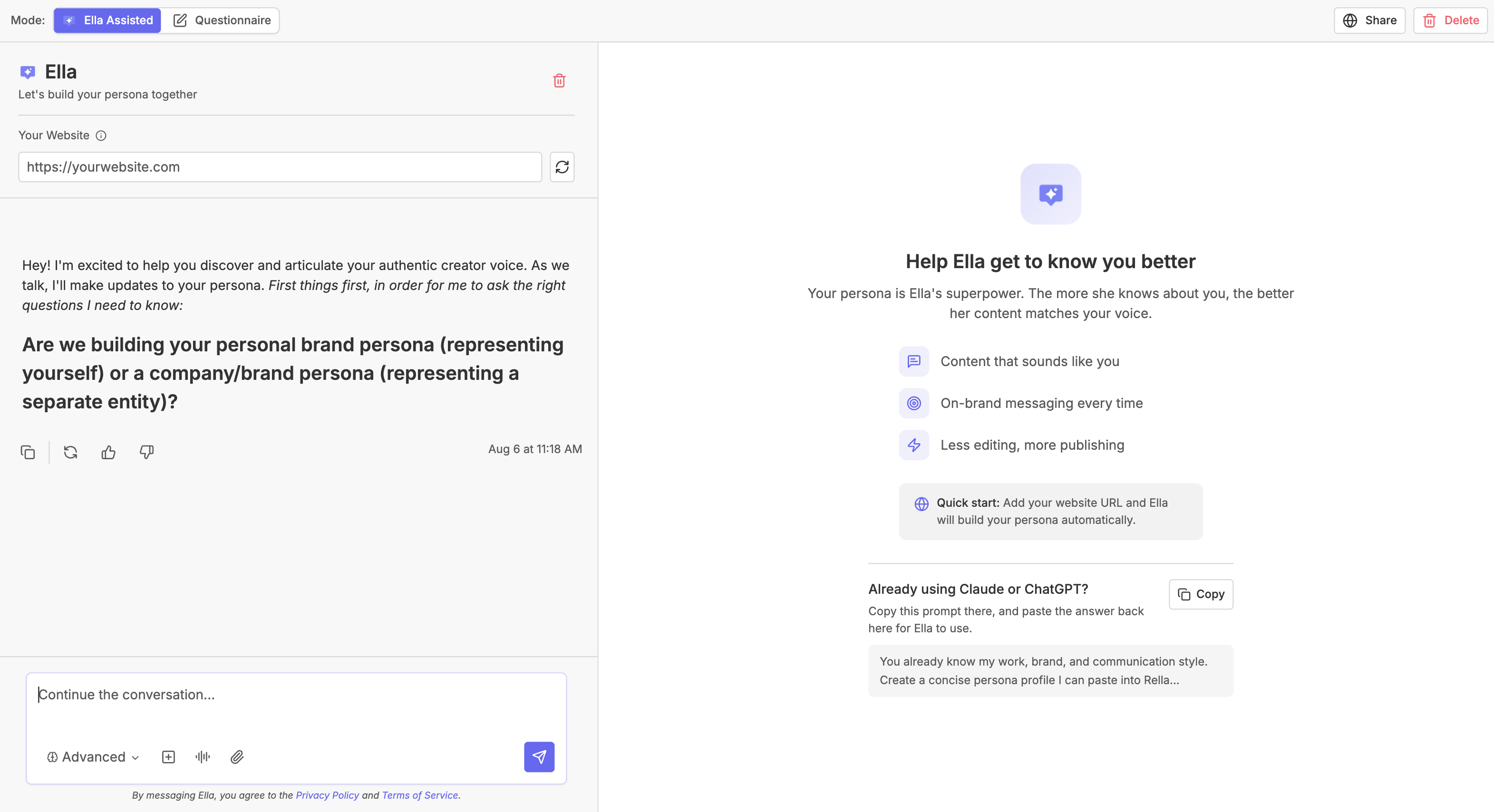
Toggle the mode picker at the top to Ella Assisted. The screen will split to show Ella's chat panel on the left and a live Persona profile preview on the right.
Under Your Website in the left panel, enter your brand's home URL in the input field
Click the Refresh button (represented by the circular arrows icon) next to the input.
Ella will automatically crawl your site, analyze its copy, and generate a customized profile.
In the chat box, you can review what she builds and type plain-English adjustments on the fly. For example: "Make our tone slightly more conversational," or "Add a content boundary to avoid discussing pricing on TikTok." She will merge these patches and update your live preview in real time.
Option B: Build Manually with the Questionnaire Mode
If you prefer to fill out your brand guidelines directly, you can complete a structured questionnaire step-by-step. Rella automatically saves your progress as you write so you never lose your work.
Toggle the mode picker at the top to Questionnaire.
Complete each of the tabbed sections in the wizard:
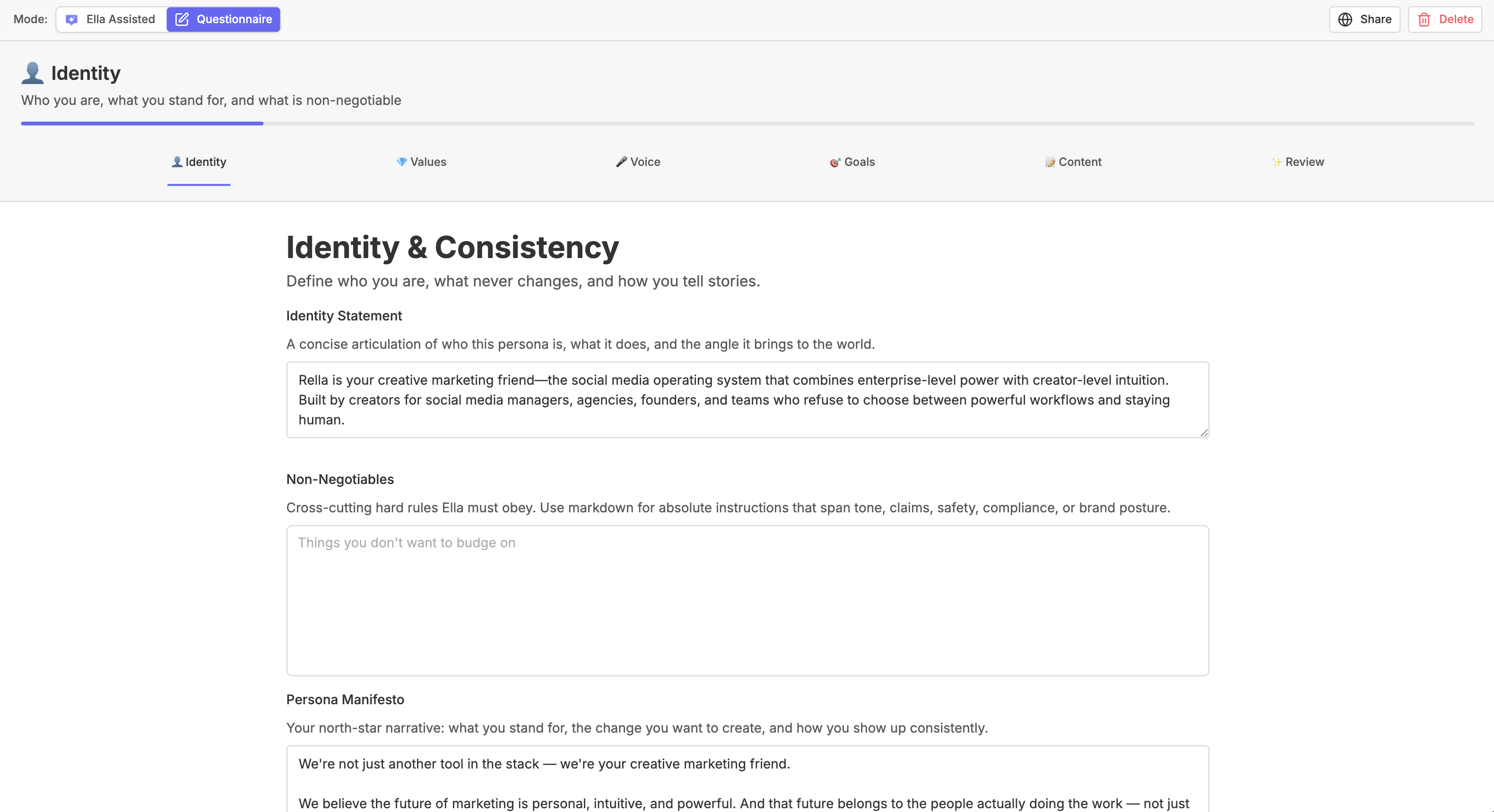
Identity: Enter your Identity Statement (who you are and what your business does) and your brand's Non-Negotiables (strict structural or formatting rules).
Values: Define your brand's Values and your preferred Storytelling Approach.
Voice: Pick your key Voice Traits, choose an Authority Level (e.g., a friendly peer or an authoritative industry guide), and compile a list of Tone Dos and Don'ts.
Goals: Detail your long-term communication Goals and outline your target Audience & Intent.
Content: Outline Platform Voice Shifts (e.g., being more casual on TikTok but professional on LinkedIn), set your Content Boundaries (topics or words to stay away from), and list your Content Preferences (recurring themes and creative constraints).
Once you reach the final Review tab, check the generated preview of your brand guidelines.
Click Done to save your active profile.
Sharing and Deleting Your Persona
Because Personas are core business assets, certain management actions are restricted to team members who hold the Manager or Admin role in that Social Space.
Sharing a Persona
You can securely share your guidelines with external collaborators or clients so they can review your brand's setup or fill out the persona.
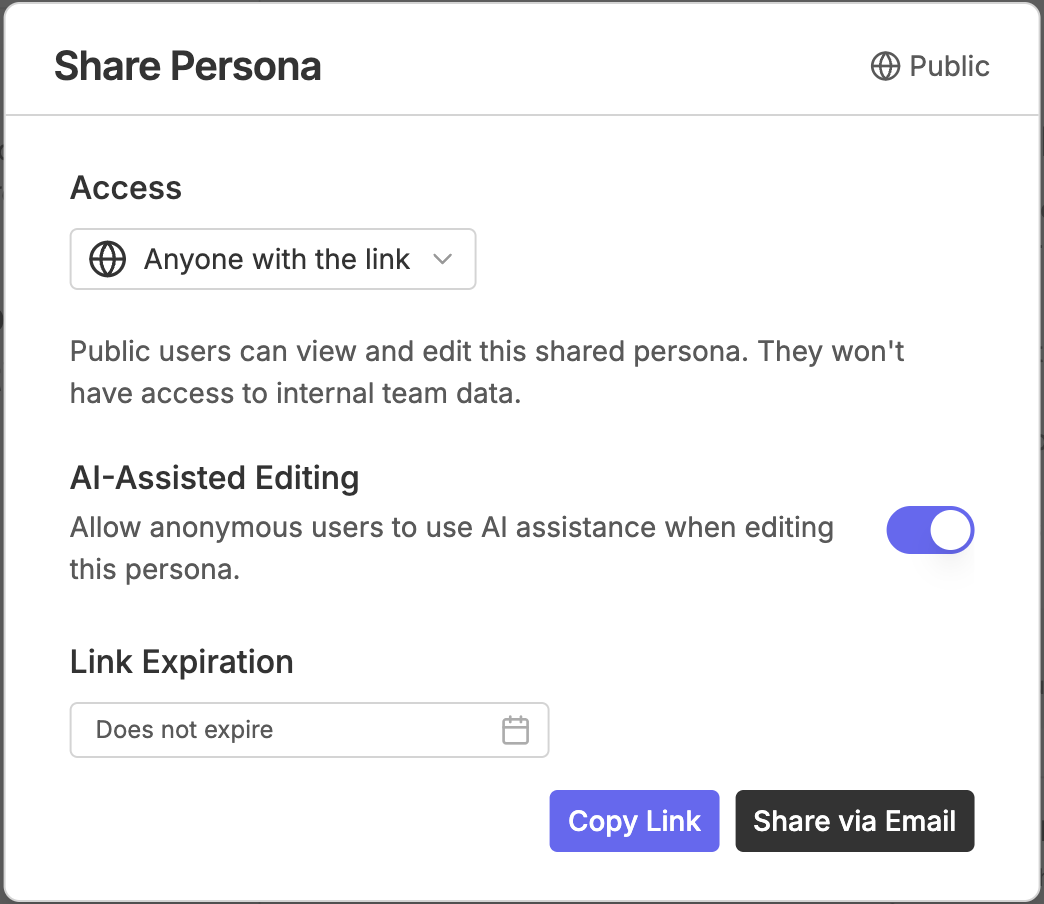
Click Share in the top action bar.
Toggle Public Sharing on or off:
Public: Anyone with the link can view your active profile. You can check Allow AI Assistance so public viewers can interact with Ella using these guidelines, or set a Share Expiration date.
Private: The profile is strictly restricted to internal members of your Social Space.
Under Invite via Email, enter your collaborator's email addresses and click Send to deliver a direct invite.
Click Copy Link to save the secure URL to your clipboard.
Deleting a Persona
If your brand direction shifts or you want to start completely fresh, you can reset your profile:
Click the Delete button (represented by the red Trash icon) in the top-right corner.
Read the warnings carefully—deleting your profile resets Ella's memory and clears her current conversation history.
Type
"My Persona"in the confirmation box when prompted.Click the confirmation button to completely reset the profile.
AI Persona FAQs
Can I import brand guidelines I've already written in ChatGPT or Claude?
Yes! In the Ella Assisted view, if your profile is empty, locate the Already using Claude or ChatGPT? card. Click the Copy button to copy our custom booster prompt to your clipboard. Paste this prompt into ChatGPT or Claude to let them format your existing guidelines into clean markdown. Once your external AI returns the formatted profile, copy the text and paste it directly into Ella's chat panel, telling her: "Import these guidelines into my persona."
Why can't I see the Share or Delete buttons?
To protect your brand settings, the option to make a Persona public, invite external viewers, or completely delete guidelines is wrapped inside our permission gates. You must hold at least a Manager or Admin role in your Social Space to use these options. If you are logged in as a standard member or client, these controls are hidden.
Does updating my Persona modify my existing published posts?
No. Updating your brand guidelines only influences how Ella creates new draft ideas, drafts Content captions, and writes copy moving forward. It will not alter any content that has already been drafted, scheduled, or published on your calendar.