Auto Post to Multiple Platforms
Last updated: June 8, 2026
Publishing the same content across different social media channels (such as Instagram, TikTok, and YouTube) is the most efficient way to maximize your organic reach. Rella provides structured workflows to draft multi-platform posts, run automated validations for each channel, and easily repurpose content.
Multiple Platform Auto Posting
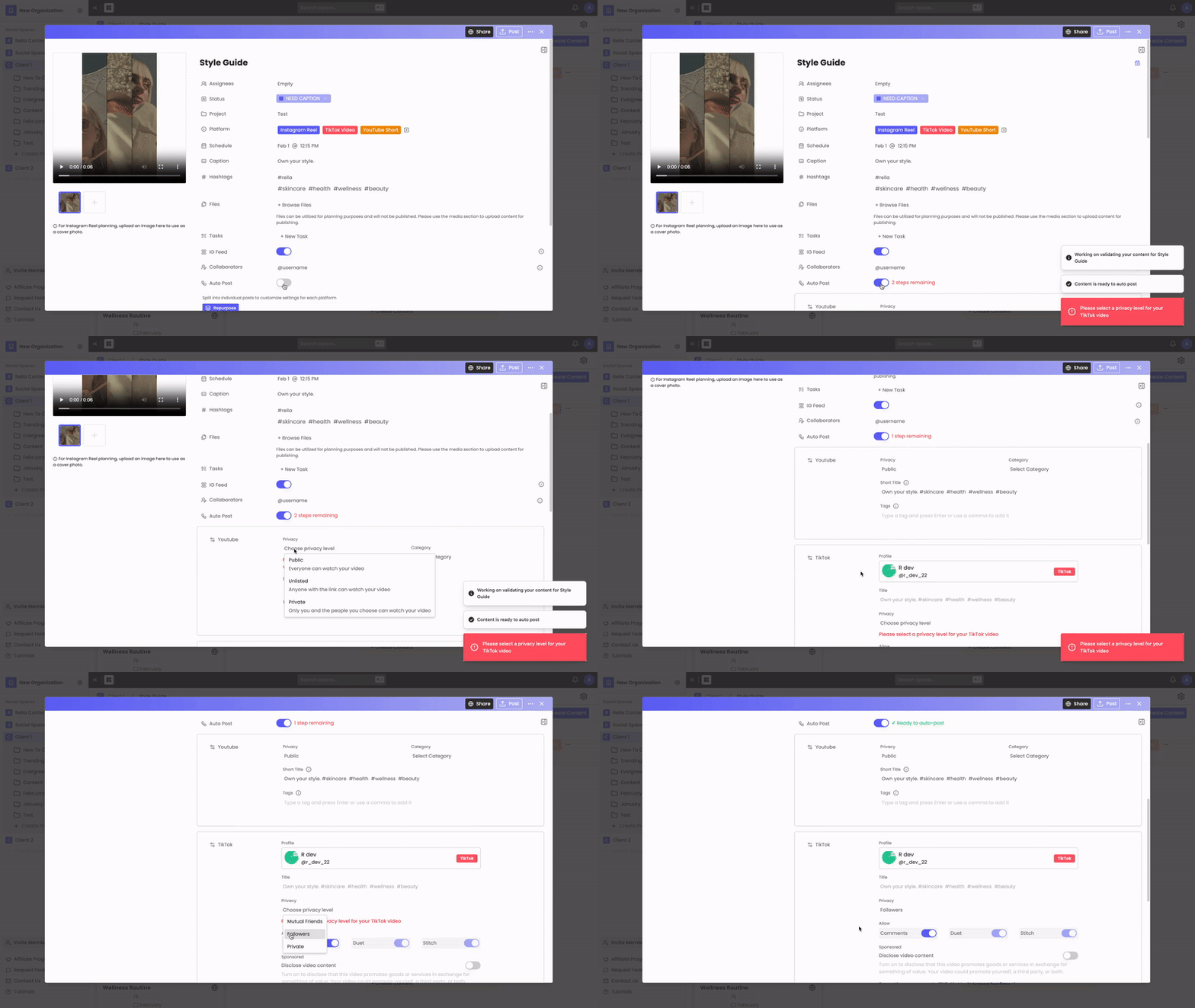
1. Multi-Platform Drafting & Shared Calendars
When you create a new post, you can select multiple platforms (such as both Instagram and Facebook) under the Platform selector.
By default, Rella groups these together as a single content item on your Calendar. You can compose a shared caption, upload your media files, and schedule a single publication time to deploy your post across all selected channels at once.
2. Platform-Specific Validations
When Auto Post is toggled on, Rella automatically runs publishing validations to ensure your content conforms to each selected platform's unique rules.
If any of your selected platforms fail to meet native guidelines, Rella will block the Auto Post toggle and highlight the specific issue. For example:
Please see the media requirements here: 📄 Supported Social Platforms
Custom platforms: planning-only platforms that are not linked to a social account — cannot be auto-published. When a custom platform is selected on a content item, the Autopost section of the content editor displays a notice explaining that the platform does not support auto-publishing. If every selected platform is a custom platform, the Autopost toggle is disabled entirely.
3. Repurposing Content (Splitting Platforms)
Because each social network has different formatting specs (like video durations or thumbnail ratios), sending the exact same caption and media across all channels isn't always ideal.
Rella's Repurpose feature splits a multi-platform post so you can customize the media, caption, and auto-post settings for each channel separately while keeping them grouped in your planning workspace.
Resource: 📄 Repurpose Content Across Multiple Platforms
When you repurpose content to a different platform, all Autopost settings for the resulting content items are revalidated immediately against the new platform's requirements.
Any settings that no longer meet the target platform's rules will surface as readiness issues in the Autopost section, so you can resolve them before the post is scheduled to publish. If content is now valid for Autopost on individual platforms, it will be automatically enabled for those platforms.
Multi-Platform Publishing FAQs
What happens if one platform fails validation but the other platforms pass?
If you select multiple platforms for a single post and only one fails Rella's safety validation (such as a caption that is too long for X but fine for Instagram), the Auto Post toggle will be blocked for the entire post. You must fix the formatting issue or split the post using the Repurpose tool before auto-publishing can be activated.
Do I need to connect each social account separately to auto-post to multiple channels?
Yes. Rella requires an active, authenticated connection token for every account you publish to. If you are scheduling a shared post for both Instagram and LinkedIn, both accounts must have valid connections under your Social Space's Links settings.