Manage Your AI Usage, Quotas, and Overage Settings
Last updated: June 2, 2026
Rella uses AI-powered features (such as Ella brand personas, caption generation, and automated media checks) to help you manage your social media operations. You can monitor your monthly usage, check quotas, and configure overage spend limits to prevent unexpected billings.
About Ella Usage & Quotas
Each Rella subscription tier includes a standard monthly quota of AI usage. Inside each billing cycle, Ella draws from this allocation to execute tasks like writing text drafts, reviewing media uploads, and executing AI-decision steps inside active Workflows.
Once your Organization reaches its included limits, Ella is temporarily paused, which also pauses any active automated Workflows that rely on AI steps. To prevent work from freezing, you can configure overage settings to allow extra, separate billing up to a monthly ceiling of your choice.
How to View Your AI Usage
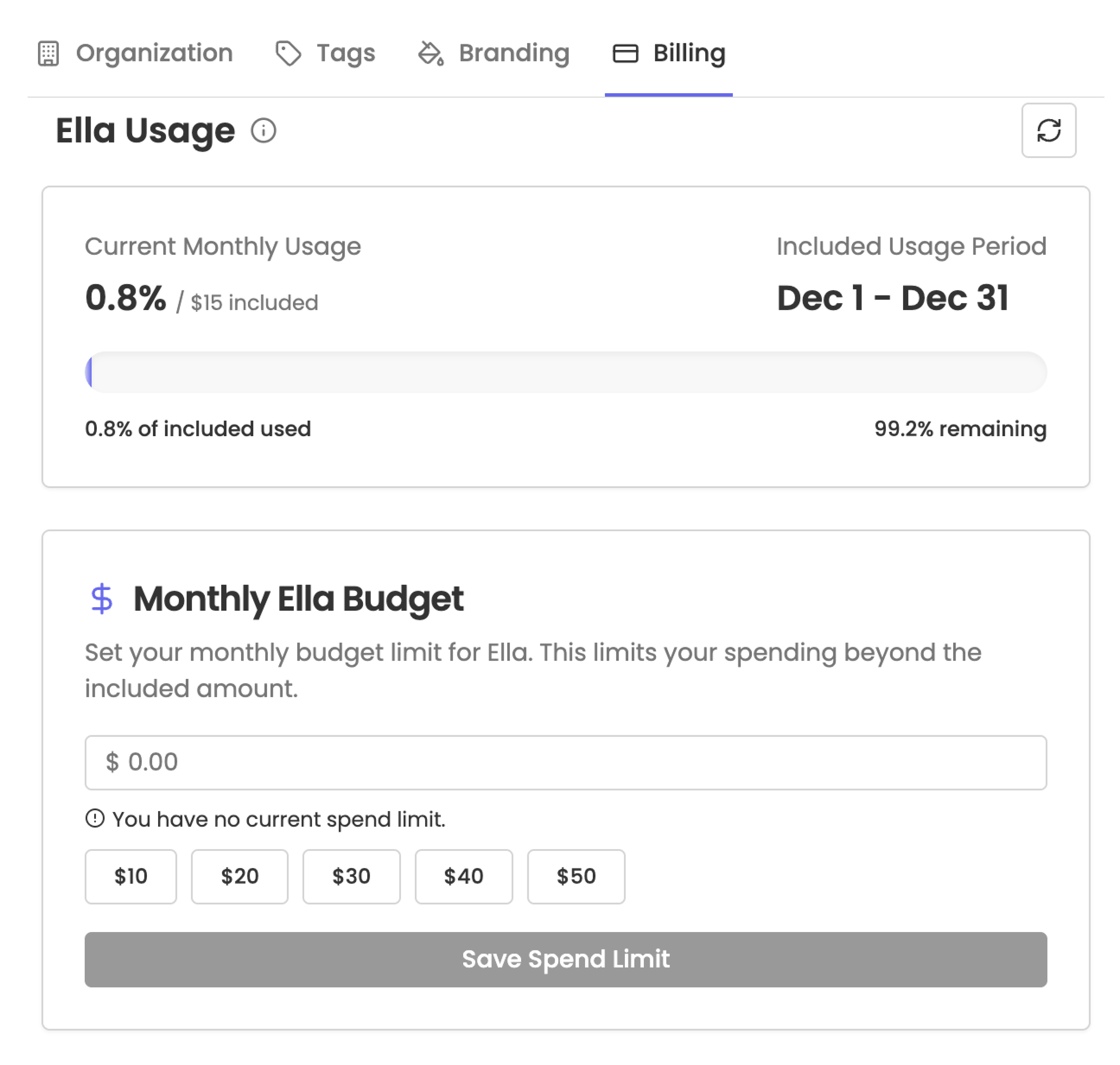
To review your team's current consumption, check your dashboard from a desktop web browser.
Click Settings in your main navigation bar.
Select Billing from the settings menu.
Scroll down to the Ella Usage section.
Here, you will see your active usage card:
Current Monthly Usage: Displays your current percentage of included tokens used
Included Usage Period: Shows the calendar range for your current billing month (resets on the 1st of each month).
AI Limits & Warnings
Rella provides visual warnings directly on your billing dashboard to help you stay ahead of your limits.
Approaching Usage Limit
If your Organization has consumed between 80% and 99% of your included monthly tokens, a yellow alert box labeled Approaching Usage Limit will appear. This notifies your team that you are close to hitting your ceiling, giving you time to adjust overage settings.
Usage Limit Exceeded
When your included usage reaches 100%, the card displays a red Usage Limit Exceeded warning. At this stage, all Ella functions are paused. Any custom Workflows that use AI steps will fail or be queued until your quota resets on the 1st of the next month, or until you enable overage spending.
How to Configure Your Monthly Ella Budget
To prevent Ella from freezing during busy campaign weeks, you can permit extra, pay-as-you-go usage. You can set a strict monthly limit to control exactly how much additional overage spending your team is allowed to accrue.
Navigate to Settings > Billing.
Scroll to the Monthly Ella Budget section.
In the input box, enter your maximum budget limit in dollars.
Note: The minimum allowed budget ceiling is $5.00.
Click Save to lock in your limit.
If you decide you want to turn off overage spending entirely (meaning Ella will always freeze exactly at 100% of your included quota), delete the value in the input box and click Save. This completely removes the spending allowance.
Member Permissions & Plan Gating
Billing settings, subscriptions, and AI configurations are highly sensitive business data.
Plan Gating: Ella Usage details and the Monthly Ella Budget configuration card only appear for accounts on Premium and Premium Plus plans.
Admin Role Required: Only the Admin of your Organization is allowed to modify your subscription plans, refresh usage data, or adjust the Monthly Ella Budget. If you are logged in as a standard member, collaborator, or client, these forms and controls are hidden from your view.
Ella Usage FAQs
What happens if I hit my Monthly Ella Budget limit?
Once your overage spending hits the exact cap you set in your Monthly Ella Budget, Ella will pause operations just as she does when included limits are reached. Any automated Workflows or caption generators that require AI processing will pause until you increase the budget limit or your billing cycle resets on the 1st of the month.
How is overage usage billed?
Included usage resets on the 1st of each calendar month. Additional overage usage is billed separately and follows your standard subscription's regular invoice cycle. If you exceed your included amount, you will see those separate charges bundled onto your next scheduled billing date.
Can standard members or managers change the budget limit?
No. Only the Admin of the Organization has the authority to view billing sheets, change subscriptions, or adjust the overage budget. Standard members and clients cannot view or edit these options.
I subscribed for more access to Ella, but I didn't use it. Will I still be charged?
Nope! When you subscribe for more Ella access, you’re setting a usage limit not committing to a fixed charge. If you don’t go over your included plan credits or don’t use the additional AI features, you won’t be charged. You only pay for what you actually use!
Once you subscribe:
You can keep using Ella immediately.
You’ll be billed for any usage beyond your included amount.
This overage billing runs on its own cycle, starting from the date you subscribed to Unlimited Ella Usage.
Example:
You’re on Rella Premium with included usage that started on July 1st, and you hit your usage cap on July 15th.
You subscribe to additional Ella Usage that same day.
You’ll be charged for any extra usage from July 15 to August 15 (your overage billing cycle).
Meanwhile, your included usage resets on August 1, so you get more included Ella time before incurring more overages.
If you go over again before August 15, you’ll continue accumulating overage charges, which get billed when your cycle ends.
In short, Ella usage resets monthly and overage charges follow your personal billing date.
Rella Premium includes standard Ella usage per seat. Upgrade to Premium Plus for additional usage. Free trial users will receive complimentary Ella usage with limited allowance.