Schedule Across Multiple Businesses
Last updated: June 4, 2026
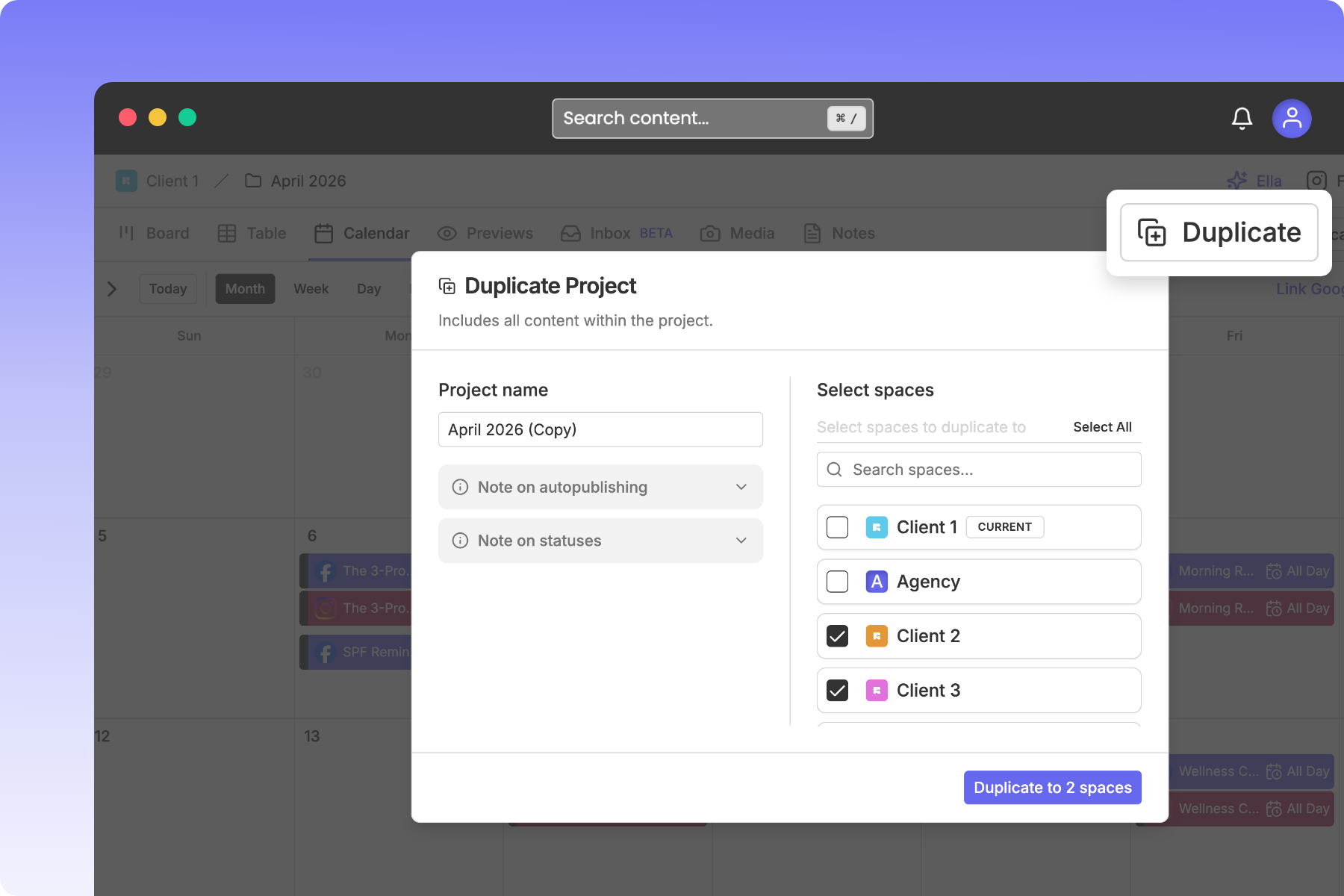
When managing multiple brands, franchises, or multi-location businesses, you may want to publish the same piece of content, marketing campaign, or announcement across different customer calendars simultaneously. Rella's Cross-Space Duplication feature lets you select your target client spaces and deploy identical posts across multiple calendars instantly.
Before You Start
You must have an Admin or Organization Owner role to duplicate content across different Social Spaces. (Managers can duplicate content within their own assigned spaces, but cannot duplicate across spaces they do not belong to).
Cross-Space Duplication requires a Premium or Premium Plus plan.
Steps to Duplicate and Schedule Across Spaces
1. Launch the Duplication Wizard
Open the Content editor for the post you want to share.
In the right-hand actions column (or the bottom toolbar on mobile), click Duplicate (the copy plus icon).
2. Select Your Target Social Spaces
A two-panel duplication modal will slide open:
Left Panel: Customize the duplicated post’s title in the Content Name field.
Right Panel: A list of all available Social Spaces inside your Organization will be displayed.
Check the box next to every target Social Space where you want this post to be scheduled.
3. Review Downstream Warnings
When you select target spaces outside your current brand, Rella displays two crucial notes under your left panel to help you adjust your post:
Auto-Publish Adjustments: Target spaces have their own brand-specific social account links. If a selected target space does not have the same social platforms linked, Auto Post will turn off and Rella will replace it with a scheduled reminder instead.
Status Matching: Each Social Space has custom status categories (such as "Draft" or "Ready for QC"). If a target space does not contain a status name matching your current post, Rella will automatically default the duplicated post to the target space's first available status category so your pipeline stays consistent.
4. Deploy Your Content
Click Duplicate to X Spaces. Rella will clone the post, including the caption, tags, and media assets, and instantly schedule them onto your target calendars.
Core Constraints & Blocks
To protect your publishing queue from processing errors, please keep these strict constraints in mind:
Media Processing Lock: You cannot duplicate a post while its primary photos or videos are still actively processing or uploading in Rella. If processing is active, the Duplicate button will be disabled, and an alert will notify you: "Duplication is disabled while media is processing."
Cross-Space Warning Badges: After deploying, Rella will trigger toast notifications showing whether the duplication succeeded or if certain details failed to transfer (for example, if a target space has expired social links or missing metadata).
Cross-Space Scheduling FAQs
Can I duplicate an entire multi-post campaign at once?
Yes. On Rella's Pro plan or higher, you can duplicate an entire Project folder (and all of the nested posts and tasks inside it) to other Social Spaces using the same folder settings picker.
If I edit the original post, will the duplicated posts update automatically?
No. Once cloned, the copies exist as independent, separate database records on each client's calendar. This allows you to tailor captions or upload brand-specific media for each client without affecting your other spaces.
Does Rella support cross-space task assignments?
No. Task checklists and member assignments are local to each specific Social Space to maintain security. When a post is duplicated across spaces, any local member assignments will be cleared so you can assign the appropriate local team members inside each space.